Selection Bubble AI Action
An advanced feature that enhances the user experience by integrating AI actions directly within application windows. WWhen a text region is selected, a pop-up appears at the cursor's position at the end of the text, enabling AI actions without moving the mouse or opening additional windows. This intuitive interface makes it easy to perform desired tasks quickly and efficiently.
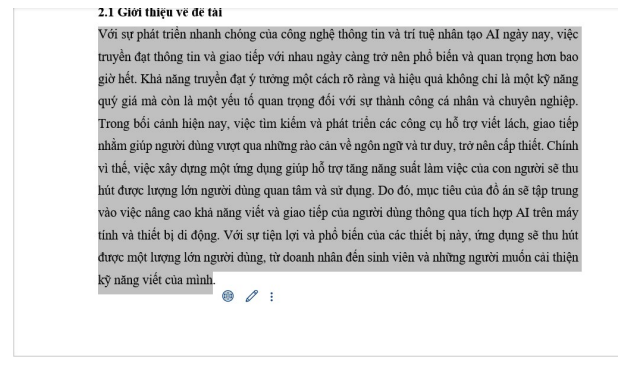
Selection Bubble Pin Menu
Notable AI Actions include features for text translation, content editing, grammar and structure correction, and simplifying text for easier understanding by various readers. Additionally, the application allows pinning frequently used AI Actions for easy access later without needing to search again. This functionality saves time and boosts productivity by providing essential tools right at hand.
.png)
Selection Bubble Full Menu Actions
After the AI Action returns a result, it can be reviewed, referenced, or copied for easy editing and improvement of the original content.
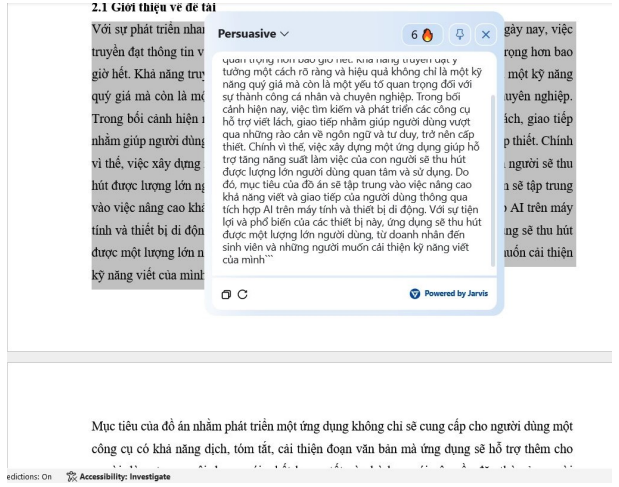
Selection Bubble AI Action - Execute AI Action Persuasive
Supercharge Your Customer Support with AI
Jarvis Helpdesk uses AI to auto-draft responses, search your knowledge base, and resolve tickets faster — no setup needed.
Start Using Helpdesk Free→